Apple Intelligence is Apple’s system-level artificial intelligence platform introduced across iOS 18, iPadOS 18, and macOS Sequoia. Rather than existing as a separate application or assistant, it is embedded directly into the operating system, allowing it to work across core apps and everyday workflows.
Supported hardware includes Macs with Apple Silicon (M1 and later), iPhone 15 Pro and Pro Max models, and iPads equipped with M-series chips. Feature availability varies depending on the device’s capabilities.
A defining characteristic of Apple Intelligence is its emphasis on on-device processing. Many AI tasks such as rewriting text, summarizing content, analyzing images, and transcribing speech, are processed directly on your device which reduces latency, and allows certain features to work without an internet connection. This significantly limits exposure personal information.
For tasks that are too demanding to be processed entirely on the device, Apple Intelligence uses Private Cloud Compute. This is a secure cloud environment built on Apple’s servers that processes requests without storing any data.
Machine Learning Frameworks
Apple Intelligence is built on several Apple-developed machine learning frameworks.
- Core ML is responsible for running machine-learning models efficiently on Apple hardware. It decides how work is shared between the CPU, GPU, and Neural Engine.
- Foundation Models provide access to Apple’s large language and multimodal models. These are what make tasks like writing text, summarizing content, and reasoning possible.
- Natural Language tools are used to analyze text. This includes figuring out which language text is written in and judging its overall tone.
- Vision handles images and video. It is used to recognize objects, understand what is in a photo, and analyze visual content.
- Speech processes spoken language. It converts speech to text, supports dictation, and enables voice-based interaction.
Together, these frameworks allow AI capabilities to be deeply integrated into the operating system without requiring you to manage models directly.
Writing Tools and Text Intelligence
Apple Intelligence introduces Writing Tools, a system-wide set of features available across applications such as Mail, Notes, Pages, and other text-based interfaces.
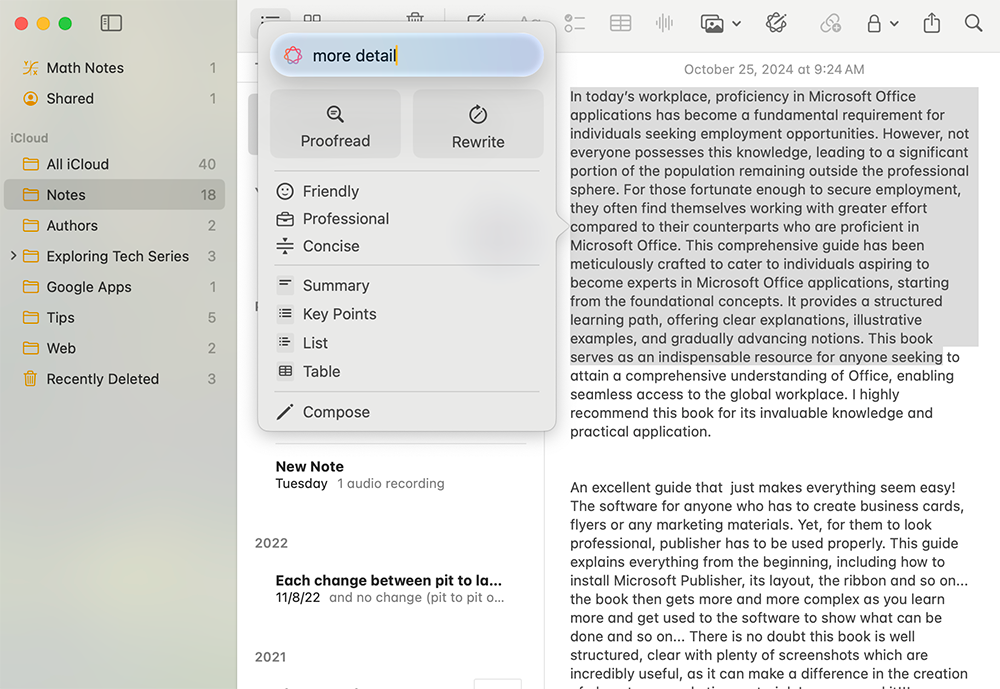
Writing Tools can spot grammar mistakes, unclear or awkward sentences, and inconsistencies in how your text is written by looking at the meaning of whole sentences, not just individual rules. You can also use them to rewrite text to sound shorter, more formal, or more casual, and to create short summaries of long documents.
Image Intelligence and Creative Tools
Apple Intelligence includes Image Playground, which lets you create images by describing them in text. These images are intentionally stylized, such as illustrations or sketches, rather than realistic photos. This makes them useful for presentations, messages, and learning materials.
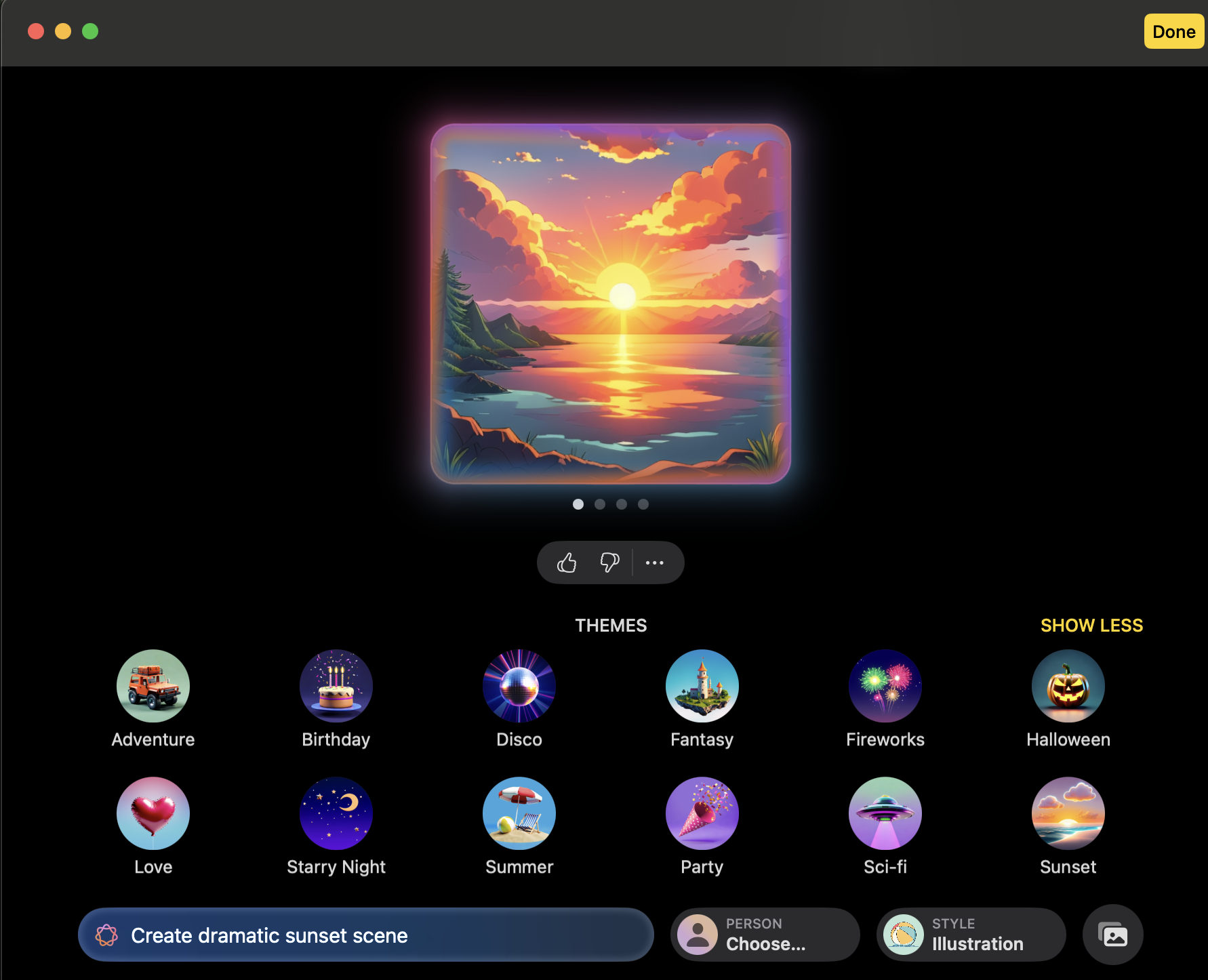
In addition to image generation, you can apply visual effects, overlays, and stylistic adjustments directly within supported apps, reducing reliance on third-party creative software for common tasks.
Photo Analysis and Content-Aware Editing
In the Photos app, Apple Intelligence powers the Clean Up feature. This allows you to remove unwanted objects or distractions from an image. When you remove something, the system looks at the surrounding area and fills in the background, so the image still looks natural. This makes it easy to tidy up photos without advanced editing tools.
Apple Intelligence also improves how Photos App recognizes what is in your images, which helps with searching and organizing your photo library.
Siri and Intelligent System Interaction
Siri has been significantly improved by Apple Intelligence. It is better at understanding natural language, following the flow of a conversation, and handling follow-up questions.
Siri can carry out actions that involve multiple apps at once. For example, you can ask it to summarize an email and then create a calendar event based on that information.
Siri can also use recent activity, such as open files or recent messages, to give more relevant responses while still respecting privacy settings.
Notifications and Information Management
Apple Intelligence introduces Notification Summaries, which group together less urgent notifications and present them as short summaries.
This helps reduce the constant interruption caused by individual alerts while making sure important notifications still appear immediately. These summaries are clearly marked as generated and can be turned off for specific apps if you prefer.
Audio Intelligence and Transcription
Apple Intelligence can automatically convert spoken audio into text. This includes voice notes and recorded meetings.
The transcription is usually done directly on your device. You can also generate summaries of long recordings, which is useful for reviewing lectures, meetings, or interviews without listening to the entire recording again.
Web Intelligence in Safari
Safari uses Apple Intelligence to make reading and research faster. Smart Highlights pull out key points from web pages so you can quickly understand the main information.
Search suggestions are also improved by taking into account what page you are currently viewing, helping you find relevant information more efficiently.
Further Reading
For more information on the subject, have a look at the following book:
- Original price was: £24.99.£19.99Current price is: £19.99.Buy now
Exploring Apple Mac: MacOS Sequoia Edition
Kevin Wilson